Wikipedia:Graphics Lab


 Graphics Lab
The Graphics Lab helps improve all graphical content stored on Wikimedia Commons and the English Wikipedia.
Wikigraphists work to improve the quality of the images that have been proposed by the community. This involves work such as extracting key elements from photos, improving the color of images or emphasizing the main subject, "stitching" multiple images together and often vectorizing images — converting to Scalable Vector Graphics (SVG). We also create new drawings, diagrams and maps when requests are made to do so.
Interested in helping out? Check out the uploading standards, then go to one of the workshops you are skilled at, and lend a hand. You can also add your entry to Wikigraphist abilities and yourself to Category:Wikigraphists you can also add {{User Wikigraphist}} or {{Mbox Wikigraphist}} to your userpage.
Can't draw a thing? You can still help us: We need people to find images that need improvement and to submit them. Anyone can make requests, even unregistered users.
For examples of work done by the Graphics Lab, see the archives of past work.
Types of work done
-
 Whitening or cleaning the background
 -
 Removal of objects and color improvement
 -
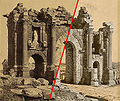 Image restoration
 -
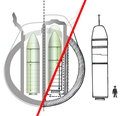 Vectorization of raster graphics


Images will be improved on request of a user/IP who submits a request on any of the three image workshops. An explanation of how to do that is shown at the top of the page.
For a better view of the capabilities of the Graphics Lab, see the archives.
| Free Software (GNU General Public License) | ||||
|---|---|---|---|---|
| Name and Function | Operating system(s) | Download | ||

|
Inkscape, the general standard for creating and editing SVG files | Windows; macOS; Linux | All | |

|
GIMP, similar to Adobe Photoshop. Used for the retouching of images, and creating raster graphics (PNG, JPEG). Can also be used to create animations (GIF) when the GIMP Animation Package (GAP) is installed. | Windows; macOS; Linux; Solaris; BSD | Windows, Linux/BSD/Solaris macOS | |

|
hugin, for the stitching of panoramic images together into one big image, correction of perspective and various other things. | Windows; macOS; Linux; BSD; Other Unix Systems | All | |

|
QGIS, to create GIS maps' layers: topographic background, shaded relief, states/provinces polygons, rivers/lakes/coasts, urban areas, etc. PNG or SVG. | Windows; macOS; Linux; etc. | All | |
| Open Jump GIS, to create SVG or PNG maps and GIS vector datasets. | Windows; macOS; Linux | All | ||

|
Blender, for the creation and editing of 3D images. | Windows; macOS; Linux; Solaris; IRIX; C source | All | |

|
Scribus, a free desktop publishing application (DTP). | Windows; macOS; Linux; Unix; OS/2; eComStation; ArcaOS | All | |

|
POV-Ray, a free 3D ray tracer. | Windows; macOS; Linux | All | |

|
Dia, create and edit diagrams and graphics that only require basic shapes. Supports exporting to vector (SVG) and various raster file formats. | Windows; Linux; macOS | All | |
-
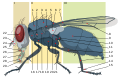 Inkscape (see more)
 -
 GIMP
GIMP -
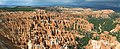 hugin
hugin -
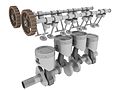 Blender
 -
 POV-Ray


Related projects and categories
- WikiProject Maps
- WikiProject Photography
- Wikimedia Commons, place to upload all free images.
- Image reviewers
- Help boards
Image improvement categories
- Category:Image files for cleanup, categorization of images which need improving. {{Cleanup-image}}
- Category:Images that should be in SVG format, a category of images that should be vectorized. {{SVG}}
- Category:SVGs for cleanup, a category of SVGs needing modifications for improvement. {{Cleanup-SVG}}
| Wikipedia:Graphics Lab/Resources |
|---|
Stale/Archival |
Content Disclaimer
Informasi ini disarikan dari Wikipedia dan disajikan kembali untuk tujuan edukasi. Konten tersedia di bawah lisensi CC BY-SA 3.0. Kami tidak bertanggung jawab atas ketidakakuratan data yang bersumber dari kontribusi publik tersebut.
- The information displayed on this website is sourced in part or in whole from Wikipedia and has been adapted for the purpose of restating it. We strive to provide accurate and relevant information, however:
- There is no guarantee of absolute accuracy. Wikipedia is an open, collaborative project that can be edited by anyone, so information is subject to change.
- It is not intended to constitute professional advice. The content displayed is for informational and educational purposes only. For important decisions (e.g., medical, legal, or financial), please consult a professional.
- Content copyright. Wikipedia is licensed under the Creative Commons Attribution-ShareAlike License (CC BY-SA). This means that content may be reused with appropriate attribution and shared under a similar license.
- Responsible use. Any risk arising from the use of information from this website is entirely the responsibility of the user.